A content agent calendar you can override: keeping people in charge of publish dates
An agent that publishes on a schedule is only usable if people can move its dates and have them stick. How to run a Content Agent calendar around launches and reviews.
The failure we worry about with publishing agents is not the writing. A review inbox catches a weak draft. The weak spot is the date. Someone moves a piece because the launch slipped, and on its next planning pass the agent quietly puts it back, or drops something else into the gap. After that happens twice, the editor starts keeping a spreadsheet next to the calendar. Now there are two schedules, and the agent only knows about one of them.
That is why the question we ask about any agent that publishes is not how much it can do without a person. It is whether a person can override its timing cheaply, and whether the override holds.
Why publish dates are often not the agent's call
Most content can go out whenever it is ready. Some can't, and the exceptions tend to be the pieces that matter most.
- Launches. A how-to for a new feature should not be live before the feature is. A day early and the page describes something customers can't find. A week late and launch traffic lands on old pages.
- Embargoes. If a partner announcement or a data release has an agreed time, the page goes out at that time, not when the queue gets to it.
- Legal or compliance review. In finance, health, or insurance, claims often need sign-off from someone outside the content team. The draft is written and approved by the editor, and it still has to wait.
- Seasonal timing. A year-end budgeting guide published in February is not wrong. It is just in the wrong month. The same goes for buying guides, tax deadlines, and enrollment periods.
- Collisions. Two pieces on overlapping topics in the same week compete for the same readers, and the internal links between them may not exist yet.
None of this shows up in a visibility gap analysis. The agent sees that a prompt has no good page on your site and that a slot is open. It cannot see the launch plan or the legal team's inbox. That is fine, as long as the person who can see them gets the final say on the date.
Review inbox or fully automated
Promptwatch's Content Agent runs in one of two modes. Drafts can go to a review inbox, where an editor approves, edits, or declines each one. Or the agent runs fully automated and publishes on its own. In both modes it plans, writes, and publishes against visibility gaps inside a publishing calendar, a monthly budget, and publish windows you set.
The mode decides who checks the words. It does not settle who controls the timing. An approved piece in the inbox still carries a date, and the agent picked it. Timing control matters most in fully automated mode, where nobody stands between the plan and the publish.
We'd split it by risk rather than by how busy the team is. Anything that names prices, describes product behavior, or touches a regulated topic belongs in the review inbox. Evergreen explainers in a topic you know well can run automated, once you have read enough of the agent's drafts in that topic to trust them. In either case the calendar is where you see what's coming and where you change it.
How moving a piece works
Promptwatch's November 13 changelog entry, "Content Agent: Move Pieces on the Calendar", added the override. You can drag a piece to another day in the month view, or to another time in the week view. The piece's detail sheet also has a Change date button, which is easier when you know the exact time or the new date is weeks away.
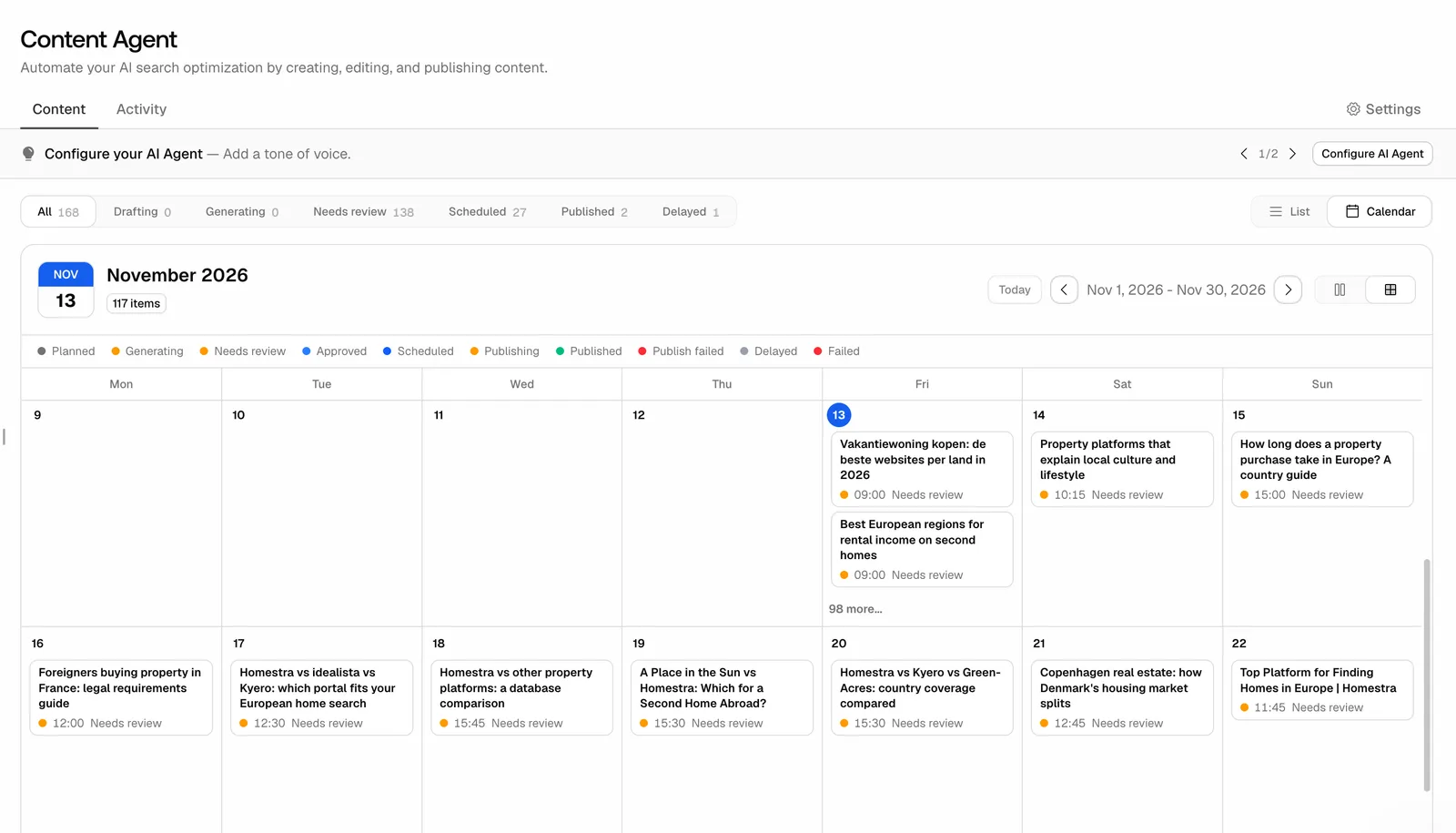 Promptwatch Content Agent calendar, from the Promptwatch changelog (November 13, 2026). Example project data.
Two details make the feature safe to use instead of merely possible. A confirm dialog warns you when the new time breaks your publishing schedule, so you make that call knowingly. And the agent's background jobs no longer move a piece you scheduled yourself. That second line is the whole point of this post. Once a person has put a piece on a date, the agent leaves it there.
The same move is available through the REST API, the MCP server, and Agent Chat. Month cards also show up to three lines of a title, with the status and time underneath and the full title on hover. That sounds cosmetic until you have a month of pieces with near-identical titles and need to find the right one to drag.
Treat the warning as a decision
It is tempting to click through a confirm dialog. Don't, at least not without a reason you could explain to a colleague. When it fires, you are choosing to break the cadence you set for the agent. Sometimes that is right: an embargo time beats any cadence. Sometimes it is a sign you are about to stack three pieces into one afternoon because a meeting ran long.
A simple habit helps. When you move a piece outside the schedule, write down why in whatever your team already uses for release notes. The calendar will show the new date. It won't show the reason, and the next editor will want to know whether the date is fixed or just convenient.
What the agent now hands you to review
The same changelog round changed the shape of new Content Agent articles. They open with key takeaways, answer each heading in its first lines, and end with a FAQ, a structure Promptwatch describes as one AI assistants can quote. For a reviewer that is useful. Read the takeaways and the opening lines under each heading first. Those are the sentences most likely to be lifted into an answer, so they are where a wrong figure would do the most damage.
The second change is about failure. When web search is down, the agent's research stops instead of guessing URLs and figures. A delayed draft is a much better outcome than a confident one with an invented statistic, and it is worth telling your editors that this is the expected behavior, not a bug to work around.
If the agent keeps getting a product detail wrong, fix the source rather than every draft. As of the November 6 update, the Content Agent searches your Knowledge Base by meaning and pulls only the passages that match the article it is writing. One corrected Knowledge Base entry beats ten corrected drafts.
Keep one project from eating the budget
Organizations with several projects can now give each project its own share of the organization's AEO articles, in the project limits dialog, and the Content Agent stays within that share. Business includes 10 AEO articles, with an add-on that goes up to 125. Without a split, a busy launch project can use the allowance before a slower project gets its turn. Set the shares at the start of the month, and revisit them when a launch is coming.
A weekly routine for the editor
This is the loop we'd run for a team with one editor and an agent in review inbox mode.
- Monday: clear the inbox. Open the calendar and filter to Needs review. Approve, edit, or decline each draft. Read takeaways and heading openers first.
- Monday: check the next two weeks against the release plan. Switch to week view. Anything that lands before its launch, inside an embargo, or on the same day as a related piece gets moved. Use Change date when you know the exact time.
- Midweek: follow the slips. When a launch date moves, move the dependent pieces with it. Agent Chat can make the move when you ask in plain language ("move the piece about the new pricing page to after the 24th"), and it asks for every value it needs before it changes anything. Teams with a release tracker can script the same move through the REST API, so the calendar follows the release plan.
- Friday: check what went live. Promptwatch follows each document from draft to live URL, then through AI crawls, citations, and AI traffic. A piece published this week that no AI crawler has fetched is an access or linking question, not a writing one.
- Friday: look at who changed what. On Business the audit log shows owners whether a change came from the dashboard, the API, an MCP client, or Agent Chat. When a date moved and nobody remembers moving it, that answers the question in a minute.
Once a month, look at which topics run automated and which go through review. Move a topic to automated only after a run of drafts that needed no factual edits. Move it back the first time one slips through.
Where this sits, and what it costs
The scheduled Content Agent with its calendar is on Promptwatch's Business plan ($579 a month) and Enterprise, which adds managed content workflows. It is not on the agency plans (Kick-off, Growth, Scale), and Professional gets on-demand AEO articles but not the scheduled agent. Our full Promptwatch review covers the rest of the plan matrix.
The reason we rate it for this job is less the calendar itself than where it lives. The agent plans from visibility gaps found in the same project, publishes to WordPress, Webflow, or Framer, and the result is measured in that project afterwards. A calendar that people can override, and that the agent respects, is what makes that loop something a real editorial team can run.
The cheapest test is the one this post is about. Start the 7-day free trial on monthly billing, put the agent in review inbox mode, move one piece by hand, and check that it is still where you put it after the agent's next planning pass.