Internal linking for AI crawlers: a working process from map to fix
How to plan, audit, and repair internal links so AI crawlers can reach the pages you want cited, and how an agent can add the right links while it writes.
Most internal linking advice stops at "find your orphan pages." That is the easy half. The hard half is deciding which pages should link to which, getting those links written without a quarterly cleanup project, and checking afterwards that anything changed. This post is about the whole loop, and about where an agent can do the work instead of producing another list.
We covered orphan pages on their own in an internal linking agent for orphan pages. Read that for definitions and a manual method. Here we go further: structure, triage, choosing link sources, and putting links in at the moment content is created.
Why links matter to AI crawlers at all
AI operators do not publish complete rules for how their crawlers discover URLs. What you control are the paths to a page: your sitemaps and your internal links. A crawler that finds a page through a link from a page it already fetches has an obvious route. A page with no inbound links depends entirely on being listed somewhere else and on the crawler choosing to go there.
So the safe claim is about reachability, not ranking. Good internal links make your pages easier to reach and make your site's structure legible. We have no evidence that more inlinks raise the chance of an AI citation, and you should not promise that to anyone. What you can say is that a page nobody can reach is a page you cannot count on being read, and being read comes before being cited.
Start with structure, not with a list of broken things
Before you fix individual pages, look at the shape of the site. Most sites have a homepage, a few section pages (a blog, docs, a product area, a glossary), and many subpages under each. A healthy structure has every subpage reachable from its section page, either directly or through a short chain, and has section pages linked from the homepage or the main navigation.
Problems tend to cluster by section. A glossary with hundreds of entries where only the index links to them. A docs folder that the new navigation forgot. A campaign folder full of landing pages that nothing links to once the campaign ends. Looking at the site by URL path shows you these clusters at once, which is why a map beats a spreadsheet for this step.
In Promptwatch, Site health has a Linking page that opens on exactly that view: a map of your site by URL path. Orphan pages (no inlinks), pages with only one or two inlinks, and redirects or errors each get their own color. You click a section to zoom in, or filter to just the weak spots.
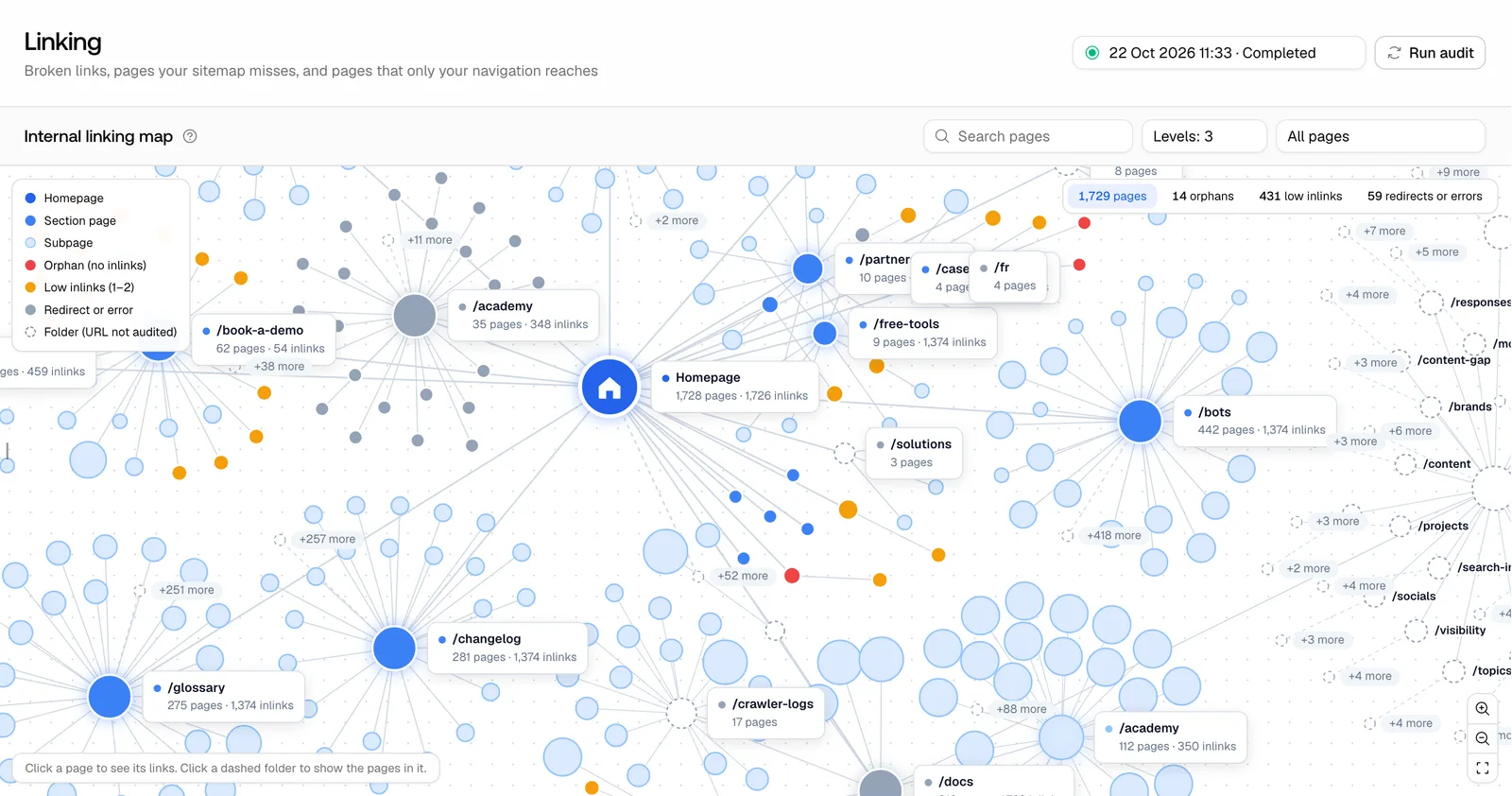 Promptwatch Site Audit internal linking map, from the Promptwatch changelog (October 28, 2026). Example project data.
Read the map for patterns first. One section that is mostly orange or red is a structural problem with one structural fix, such as a missing index page or a navigation gap. Scattered weak pages across healthy sections are editorial problems, fixed one link at a time.
Know what your audit counts
An audit's definition of "orphan" is only as good as the rules behind it, and those rules change what you should do.
Promptwatch's site audit no longer follows nofollow links, and it skips CMS and edge paths that are not pages (both from October 28). The first rule matters more than it looks. If a page's only inbound links carry nofollow, the audit will show it as orphaned. That is correct for the question "can a crawler follow a link here," and it is a common side effect of comment widgets, footer templates, or CMS defaults. Check the source of the link before you write new content around the page.
Since October 19, audits also count only pages that are actually served as orphans, and they skip content checks on redirected pages.
Then there is scope. Sitemap-only audits check only the pages in your sitemaps, and new projects start with that setting on. That keeps the audit focused on pages you claim to care about. The tradeoff is that pages outside every sitemap will not be checked at all, so if you suspect forgotten pages, run with it off at least once.
Triage by where the page came from
Every page list in the audit shows how a page got into it: your sitemap, a link from another page, Search Console, or a site map crawl. That source is a quick triage tool.
- In the sitemap but with no inlinks: you say the page matters, your site does not link to it. Either link it or take it out of the sitemap.
- Found through Search Console only: Google knows the URL, but neither your sitemap nor your links lead there. Often an old page. Decide whether it should live.
- Found by a link but missing from the sitemap: reachable, unlisted. Add it to the sitemap if it is meant to be found.
For each weak page you keep, there are three outcomes: link it, merge it into a stronger page and redirect, or retire it. Do not link a page you would not want cited. Adding links to a thin or outdated page just makes it easier to find something you would rather nobody read.
Pick the pages that give links, not only the ones that need them
This is the step most link projects skip. Teams find the weak page and then add a link from wherever is convenient. The better question is which existing pages are already doing well with crawlers and AI engines, because a link on a page that bots already fetch is a route they can actually take.
If you have crawler logs, sort your section's pages by AI crawler visits and pick donor pages from the top of that list that cover the same topic. In Promptwatch, a page opened from the Sitemap has an Agent Analytics tab with citation visits, crawler visits, and the crawler logs for that URL, plus an AI Visibility tab with its citation rate and position over time (both added November 4). A page that is crawled and cited for the topic is the right place to link from.
Then write the link like an editor. Put it where a reader would want the next step. Use anchor text that names the destination's subject. We would take one relevant contextual link from a page in the same topic over ten links from a sitewide footer, because it tells readers and crawlers what the destination is about.
Fix redirects and broken targets in the source
Internal links that point at redirects or errors waste requests, for crawlers and for people. Broken internal link issues in the audit list each broken target with its status code and the anchor text, which tells you exactly which sentence to edit. For redirects, change the link to the final URL rather than relying on the redirect. Each page's Linking tab shows the pages that link to it on one side, the pages it links to on the other, and broken links in red, so you can do this page by page without exporting anything.
Let the agent link while it writes
Cleanups decay. A site that publishes every week creates new weak pages every week, and a quarterly linking sprint is always catching up. The fix is to have links added when the content is created, and that is where an agent earns its place.
Since October 2, Promptwatch's Content Agent looks for relevant pages on your site before it starts writing, so internal links are in the article from the first draft. It suggests pages with many Search Console impressions but few clicks first. That choice is sensible: those are pages Google already shows for real queries that are not getting visits, so a new route in has an obvious upside there. The agent also stopped linking your homepage every time the brand name comes up, which is the most common mistake automated linking makes.
New articles need inbound links too, not only outbound ones. When the agent publishes a new page, add it to the relevant section page and link it from one or two donor pages in the same topic. Otherwise you have just created next month's orphan.
Verify, then repeat weekly
A fix is done when the data says so. After the next audit, the page should have left the orphan or low-inlink color on the map, and the header of its Sitemap page lists its linking pages. Weeks later, check its Agent Analytics tab: are AI crawlers requesting it now, and did they before? Compare against a few weak pages you left alone, so you are not reading normal variation as a result.
The Tuesday site audit email keeps this on a rhythm. It brings the health score, how many issues were fixed since the last audit, and the top issues AI crawlers may trip over. Our post on turning the weekly audit into a fix queue covers how to keep that list short.
A routine you can run
- Tuesday: read the audit email, open the Linking map, filter to weak spots.
- Look for clusters by section first. Fix structural gaps with an index or navigation change.
- Triage single pages by source: link, merge, or retire.
- For each page you keep, pick one or two donor pages that bots already crawl and AI already cites for that topic.
- Fix broken and redirected targets in the source sentence.
- Make sure every new article goes out with links in and links out.
- Check the next audit and, a few weeks later, the crawler logs for those URLs.
Doing this in Promptwatch
You can do parts of this with a desktop crawler and a log export. What gets hard is joining the three views: the linking structure, what AI crawlers actually fetch, and what the writing tool links to. That join is why we would run this workflow in Promptwatch.
The site audit with the Linking map, page sources, and the per-page Linking tab is on every paid brand plan, with up to 1,500 pages on Essential ($95/mo), 5,000 on Professional ($245/mo), and 25,000 on Business ($579/mo). Crawler logs, which you need for choosing donor pages and verifying the fix, start on Professional. On-demand content with internal links picked before writing comes with AEO articles from Professional, and the automated Content Agent that plans and publishes on a schedule is on Business and Enterprise. The Agent Chat panel also opens on the Linking page and answers from what is on screen, so you can ask it which sections hold the most weak pages.
Every self-serve plan has a 7-day free trial on monthly billing. Connect your sitemap, let the first audit finish, and see what the map shows for your site: start the trial from the pricing page.