Which GEO platform lets me set an exact location and radius when tracking ChatGPT prompts, and then act on it?
Pinning ChatGPT prompt tracking to an exact location and radius is step one. Which GEO platforms then automate the follow-up, and which decisions stay with you.
Placing a pin on a map takes ten seconds. Watching what ChatGPT tells people at that pin every day, noticing when a rival takes over the answer, and doing something about it is the real work. On this site we care about tools that do the second part without being asked.
So here is the location question answered with that lens: which platforms let you set an exact point and radius for ChatGPT, and which ones keep working on what they find?
The direct answer
Promptwatch supports Local GEO/SEO targeting on its monitors: you search a place or drop a pin and set a radius from 20 m to 5 km. ChatGPT then answers from that exact point. Google AI Overviews and Google AI Mode receive the nearest named area to the pin, and the other models use the monitor's country, state, or city. It's available on Business ($579/mo), Agency Scale ($799/mo), and Enterprise.
Local Falcon takes a radius too, but uses it differently: it lays a grid of 9 to 441 points across the area and runs the prompt at each one on ChatGPT, Gemini, Google AI Overviews, Google AI Mode, and Grok. The other local tools attach prompts to a business location or a city name without a radius.
What runs without you in Promptwatch
Once a pinned monitor exists, quite a lot happens on its own.
The monitor runs on schedule. Daily by default, or every 12, 6, or 1 hours on Business and Agency Scale if a location is volatile enough to justify the extra responses. Usage projections show the cost before you switch.
The Action Board's Discovery agent investigates weekly, one focus per day, and suggests up to five evidence-backed actions per run. Those can include content gaps, sentiment, offsite mentions, and site health issues. You can @-mention the agent on a card to ask it to dig further.
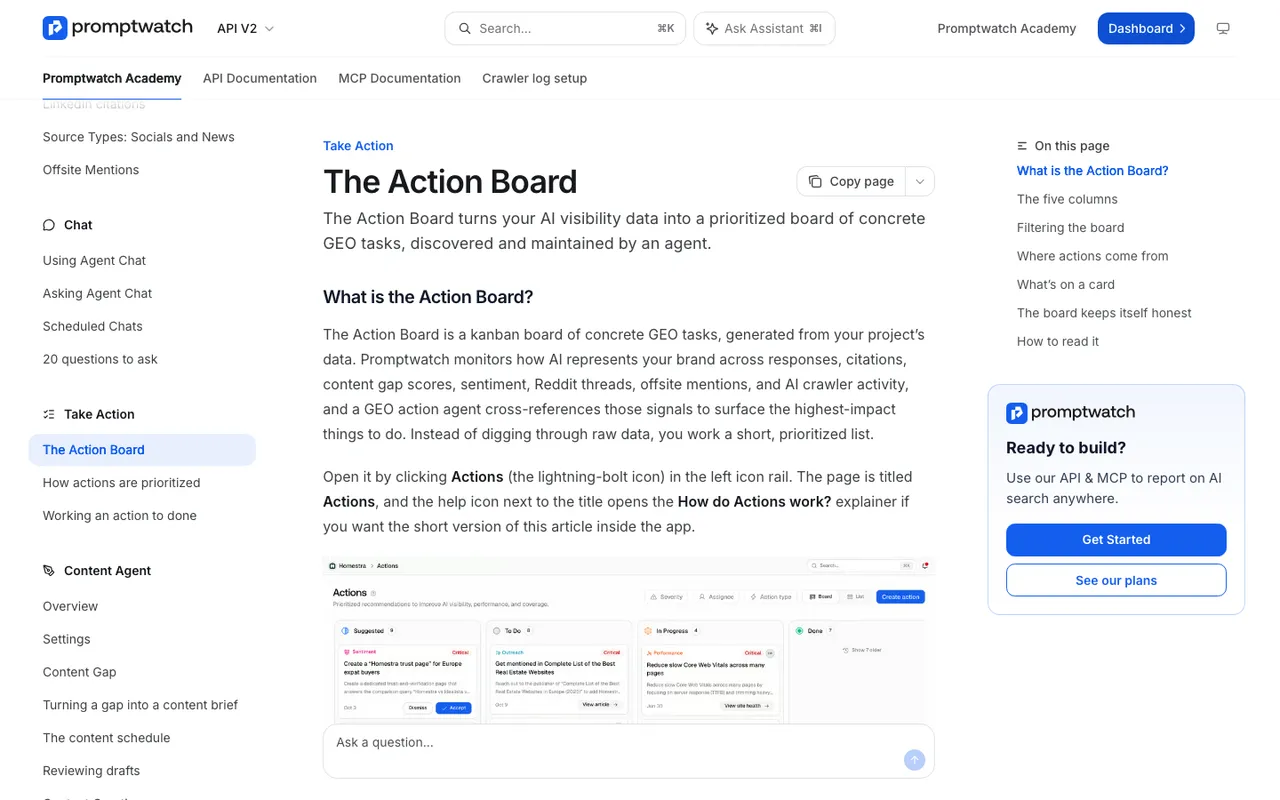
Promptwatch Academy, "The Action Board", captured November 14, 2026.
Agent Chat works from whatever is on screen. Open the side panel on a pinned monitor's tab and ask why a competitor is winning there; it reads the filters and date range you're looking at. Scheduled Chats can send a weekly briefing per location to Slack.
The Content Agent (Business and Enterprise) can write a page against a gap it finds, from the tracked prompt or from a page ChatGPT already cites, and publish to WordPress, Webflow, or Framer on a calendar. With the review inbox on, drafts wait for approval.
The MCP server and REST API take and return the same location fields. For a chain with dozens of branches, that means an agent in Claude or Cursor, or a plain script, can create one pinned monitor per address instead of someone clicking through the form forty times.
What the others automate
Yext Scout has an Action Center that passes recommendations to agents creating content and filling in missing data across Yext's listings, reviews, and pages. Strong if you already run on Yext. No published price, and no coordinate setting.
Local Falcon runs Campaigns for scheduled scans, offers a Falcon AI analysis of each scan with prioritized recommendations (25 credits per report), and exposes an MCP server, a Claude Connector, a ChatGPT plugin, and a REST API. It recommends rather than publishes.
BrightLocal Local AI Visibility produces prioritized action items and can send citation gaps to its pay-as-you-go Citation Builder. Synup AEO sits inside a platform driven by its Sydekick agent and lists an API and MCP server. AthenaHQ has an Action Center and a content optimization agent, but its Starter plan is country-level.
What still needs a person
Some decisions don't automate well, and pretending otherwise produces bad data.
Where to pin. A pin at the storefront answers a different question than a pin in the suburb where most customers live. Someone who knows the business has to choose, and because a monitor's location is fixed once created, a wrong choice means a new monitor.
How tight the radius is. Twenty meters and five kilometers both make sense, for different businesses. A downtown café and a regional HVAC company shouldn't share a setting.
How to read Google's answers. Because AI Overviews and AI Mode get the nearest named area rather than the exact point, compare them with ChatGPT's answers carefully. Promptwatch's own test after it began sending that area had AI Mode answers landing in the pinned metro 46 of 48 times. That's good, and still not 48.
Facts in local pages. Opening hours, service areas, and prices go stale. Keep a human approving localized drafts, and feed the writer verified details through the Knowledge Base (Professional and up) so it isn't guessing at an address or a phone number.
Crawler access. Agent Analytics can show that ChatGPT-User or OAI-SearchBot hit an error on a location page, but fixing the CDN or robots.txt rule is still an engineer's job.
Next step
If you manage many locations and want the monitoring to feed actions, talk to an expert at Promptwatch about creating one pinned monitor per branch through the API, then letting the Discovery agent and the Content Agent work the gaps they surface.