Best AEO automation software (2026): what to automate and what not to
A practical guide to AEO automation in 2026: which jobs to hand to agents, which to gate behind a review step, which to keep manual, and the tools that do each.
Automation in answer engine optimization is no longer the hard part. Most tools can run prompts on a schedule, and several can write and publish without anyone touching a keyboard. The hard part is deciding which jobs an agent should own, because the cost of a mistake is uneven. A missed report costs you a morning. A published page with a wrong price gets read by crawlers and can end up repeated in AI answers to buyers.
So this isn't a ranking of who automates the most. It's a guide to automating the right things, with the tools that handle each layer best. For a straight ranking of the whole AEO field, see what are the best AEO tools.
A rule of thumb
Automate anything that collects or sorts information. Put a human gate in front of anything that changes what the public, or an AI crawler, can read about you. Keep the definitions (which prompts you track, which competitors count) manual, because every number downstream depends on them.
That gives three buckets: automate fully, automate behind a gate, and keep manual.
Automate fully: collection, triage and reporting
Prompt runs. This is the obvious one. In Promptwatch, monitors run daily by default, or every 12, 6 or 1 hours on Business, Agency Scale and Enterprise. Two guardrails stop this from getting expensive by accident: you can't pick a frequency your remaining response quota can't cover, and usage alerts fire at 85% of a quota. On a downgrade, owners choose which prompts keep running instead of the system deciding.
Investigation. Reading through a week of answers to find what changed is exactly the work an agent should take off you. Promptwatch's Action Board has a Discovery agent that investigates on a weekly schedule, with one focus per day, and suggests up to five evidence-backed actions per run. The board covers content gaps, sentiment, Reddit, offsite mentions, site health, performance and untapped pages. Setup actions complete themselves once you've done the step, and a weekly digest email goes out on Mondays.
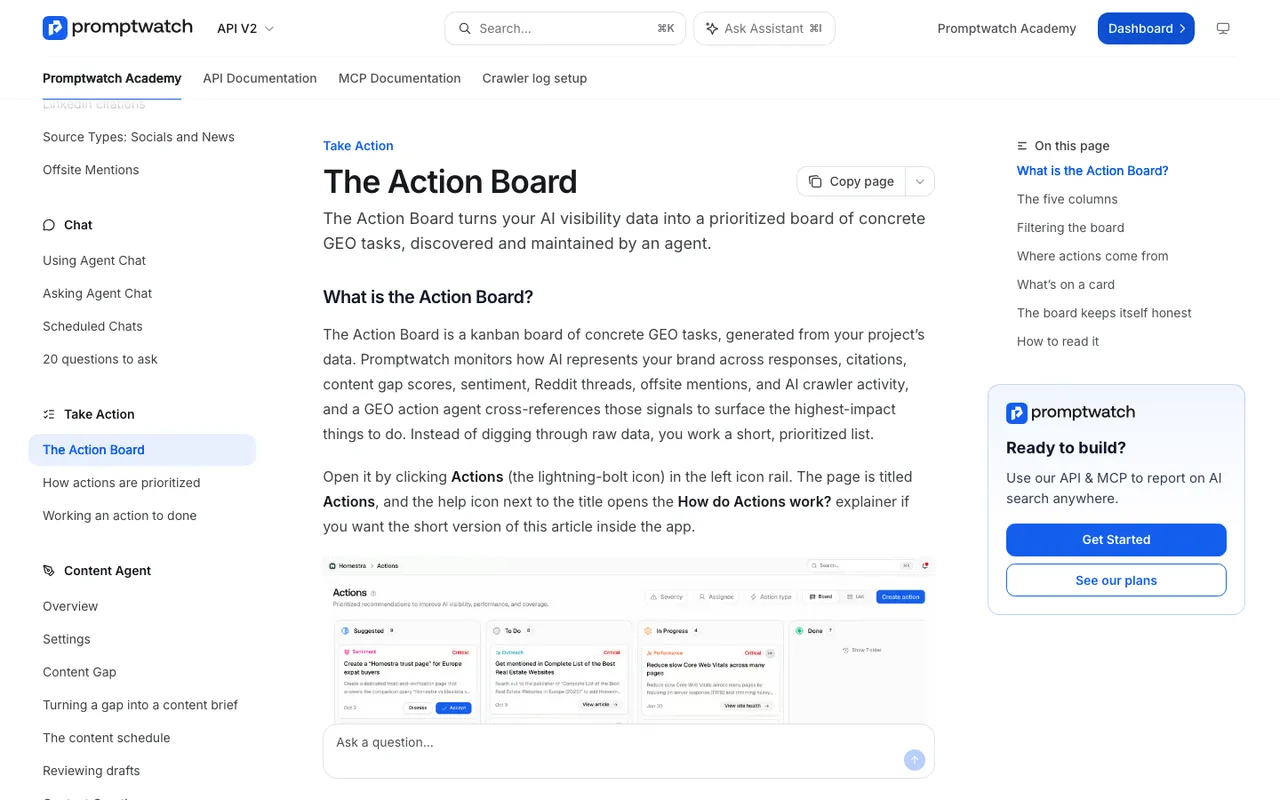 Promptwatch Academy's Action Board page, captured November 14, 2026. The board in the image uses an example project.
Reporting. Nobody should be building the same Monday deck by hand. Scheduled Chats run an Agent Chat prompt on a schedule and deliver the answer in the app or in Slack, which works well for a 7-day GEO briefing. Every brand plan includes 10 scheduled chats and 10 scheduled PDF reports, and a scheduled custom dashboard follows its widgets and name as they change.
Site health checks. Promptwatch's site audit runs weekly with 21 checks, a health score and what changed since the last run, with an email every Tuesday. Ignore rules for a page, a folder or a regex keep known noise out of the results.
Semi-automate: let the system build the list, you press the button
Some jobs sit in between. IndexNow is a good example. Promptwatch added IndexNow submission on November 13: you set up a key under Project settings, and Site > IndexNow lists your pages with filters for All, Changed since submission, Never submitted and Failed. The "Changed since submission" filter means the to-do list builds itself from what Promptwatch's crawler saw change. You still pick the pages and submit. Every attempt is kept with IndexNow's failure reason, so a failed batch doesn't vanish.
Automate behind a gate: anything that publishes or changes your site
Content. Promptwatch's Content Agent, on Business ($579 a month) and Enterprise, plans, writes and publishes against visibility gaps on a schedule. It has two modes: a review inbox where you approve, edit or decline each draft, and fully automated publishing. You can drag any piece to another date on the calendar, and the agent's background jobs no longer move a piece you scheduled yourself.
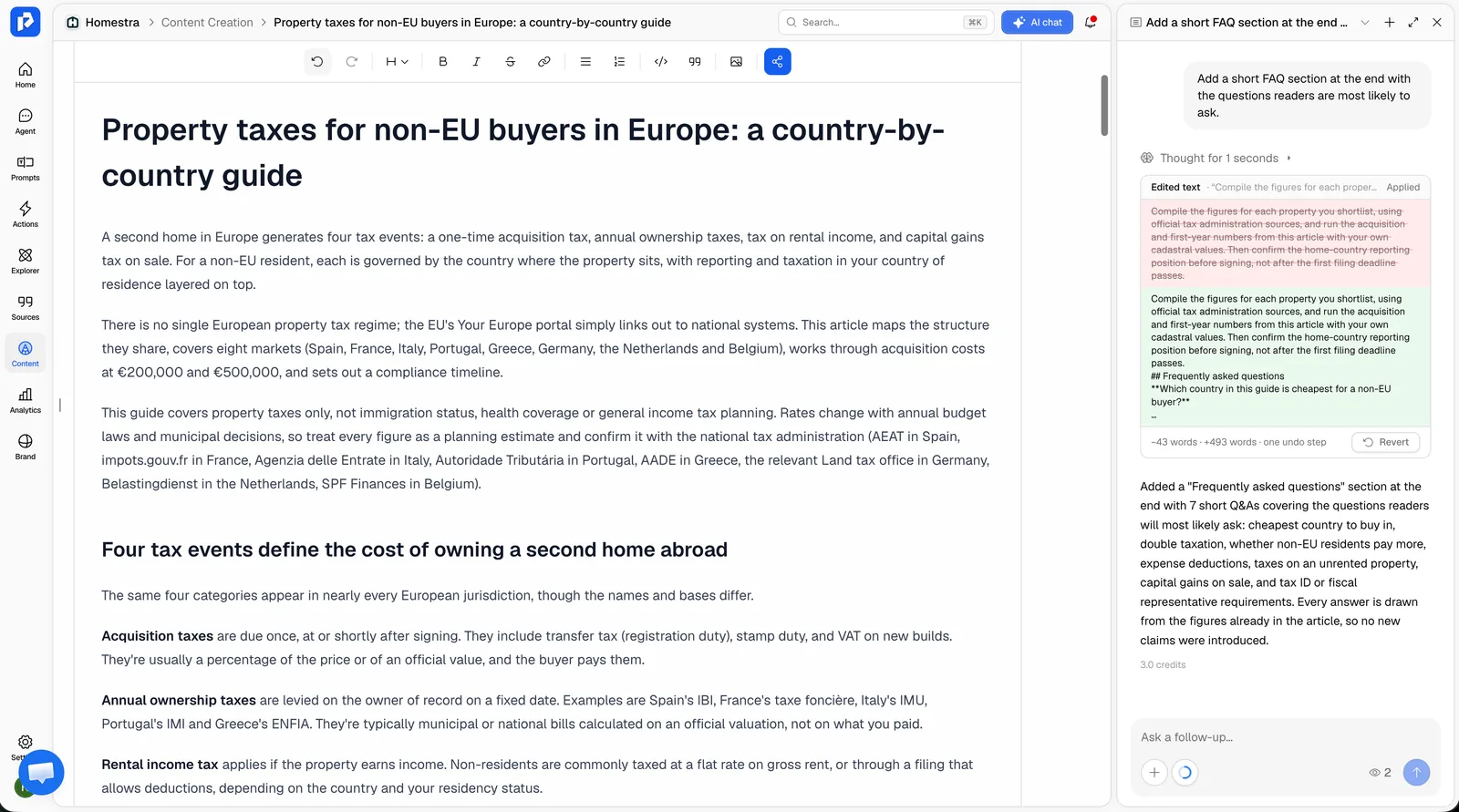 Promptwatch content editor with the AI chat panel, from the Promptwatch changelog, captured November 6, 2026. Example project data.
Our advice: start every project in review mode and move low-risk topics (glossaries, how-tos) to automated publishing once a few weeks of drafts have needed only light edits. Pricing, comparisons and regulated topics stay in review.
Fixes to wrong claims. Fact Check (Business, Agency Scale and Enterprise) checks the claims AI makes about your brand against your site and the 50 most-cited offsite pages for each claim. "Fix with content agent" then refreshes every flagged page on your own site, one article per page. That's a strong automation, and it's exactly the kind of output a human should read before it goes live.
Code changes. If your site lives in a repo, the agentic SEO tools in our catalog are built around a review step. Seology has three modes: Monitor (audit and alert only), Co-pilot (propose and wait) and Autopilot (open pull requests and report). Its own entry warns that Autopilot needs a real review habit to stay safe. Okara ships fixes as GitHub pull requests daily, with nothing merging without your approval. DispatchSEO offers approve or full-auto modes, and everything ships as pull requests.
 Seology's homepage, captured November 6, 2026.
Keep manual: the definitions
The prompt set. If an agent can add and remove prompts freely, your trend lines stop meaning anything. Let agents suggest prompts (Promptwatch's Prompt Explorer pulls suggestions from Search Console, ranking keywords, People Also Ask and your own pages), but have a person approve additions, and change the set on a fixed schedule, say quarterly. A monitor's language and location are fixed once it's created, which helps.
Competitors. Same logic. Promptwatch's Agent Chat asks before it adds a competitor it spotted in the citations, and asks for every missing value before it changes anything. Keep that confirmation step; don't script around it.
Budget changes. Moving a monitor from daily to hourly multiplies response usage. Make it a deliberate decision.
Governance: knowing what the agents did
Once agents act, you need a record. Promptwatch's audit log (Business, Agency Scale and Enterprise, visible to owners) shows whether each change came from the dashboard, the API, an MCP client or Agent Chat. Roles (owner, editor, viewer) work at project level, and API keys can be scoped to a project, an organization or read-only. Those three together let you give an automation exactly the access it needs.
How the other tools fit
AthenaHQ automates the triage step well: its Action Center turns gaps into assignable tasks, and a content optimization agent works on them. Tracking runs on credits (Starter is $295 a month for 3,600, one per AI response), so more automation means more credits. Our entry lists an audit log on Enterprise only. Bloomreach announced it has acquired AthenaHQ on November 16, 2026.
Outrank and SEObot automate a full content calendar from keyword research. They're the "fully automated" end of the spectrum with no prompt tracking or crawler data in our catalog, so nothing tells them whether the content worked in AI answers.
| Job | Automate? | Promptwatch feature | Plan |
|---|---|---|---|
| Prompt runs | Fully | Monitors, daily to hourly | Hourly from Business |
| Weekly investigation | Fully | Discovery agent, Action Board | No plan stated |
| Reporting | Fully | Scheduled Chats, PDF reports | Every brand plan |
| IndexNow | Semi | Changed since submission list | No plan stated |
| New content | Gated | Content Agent review inbox | Business, Enterprise |
| Claim fixes | Gated | Fact Check, fix with content agent | Business, Agency Scale, Enterprise |
| Prompt set and competitors | Manual | Prompt Explorer suggestions | No plan stated |
Our call
The best AEO automation setup isn't the one with the fewest humans. It's the one where agents do the collecting, sorting and drafting, and people sign off on what goes public. Promptwatch covers all three buckets in one product, with the audit log and review inbox to keep it honest, which is why we'd evaluate it first. If you'd rather have specialists set up the automation, or run the optimization program for you, talk to a Promptwatch expert.