Best AI blog writer for getting cited in ChatGPT and AI Overviews, judged on what it does without you
Which AI blog writers act on ChatGPT and AI Overviews citation data by themselves, which only draft, and which steps in a citation workflow still need a human.
A blog writer that waits for you to type a topic is a typewriter with autocomplete. For AI search, the interesting question is what a writer does on Tuesday morning when nobody has opened it: does it notice a prompt you dropped out of, draft a page for it, publish, and come back later to check whether ChatGPT or Google AI Overviews picked it up?
We sorted the field by that standard. Tools that act come first. Tools that report or draft on request come after.
The loop an agentic writer has to close
Think of the job as a cycle with five stations: find the gap, write the page, publish it, watch for crawls and citations, then refresh what decays. Most "AI writers" cover station two. A few reach station three. Very few touch four and five, because that requires tracking data the writer itself doesn't own.
Station five matters more than people expect. Promptwatch's report "What Is the Half-Life of Content in ChatGPT?" followed every page ChatGPT cited on July 6, 2026 for 90 days. Half of the news pages were no longer cited after 36 days. Landing pages (78%) and docs (76%) were still cited at 30 days, and product pages, reviews, and how-tos reached their half-life after 74 to 77 days. A writer that publishes and forgets is building on sand.
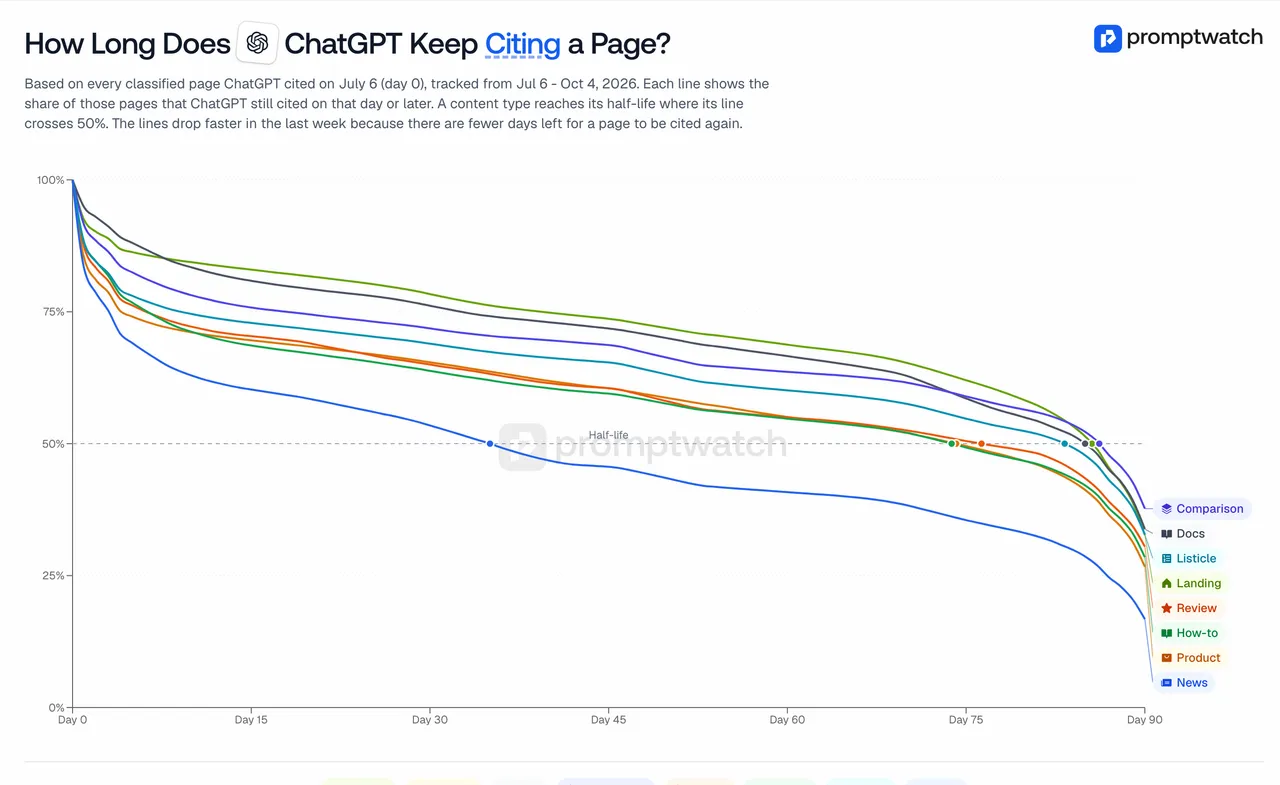
Promptwatch data report on content half-life in ChatGPT, captured November 14, 2026.
Writers that act
Promptwatch: the full loop
Promptwatch covers all five stations, which is why it heads this list. The Content Agent (Business at $579/mo, and Enterprise) runs on a publishing calendar with a monthly budget and publish windows. You choose between a review inbox, where you approve, edit, or decline, and a fully automated mode. It picks internal links before writing, favoring pages with many Search Console impressions but few clicks.
The surrounding agents are what make it more than a writer:
- The Action Board's Discovery agent investigates on a weekly schedule and suggests up to five evidence-backed actions per run, including content gaps. Answer Gap tasks have a "Create content" button.
- Agent Chat can queue content and work the Action Board from a conversation. Scheduled Chats can deliver a briefing in-app or in Slack.
- Content Refresh proposes diff-style updates for existing pages, which is how station five gets done.
- The hosted MCP server and REST API expose the same data to Claude, ChatGPT, Cursor, or your own scripts.
After a page goes live, publish status tracking follows it through AI crawls, citations, and AI-referred traffic. Citation Trends adds first cited, ramp-up days, peak rate, and decay half-life per page. No published figure says how many days a crawl takes to turn into a citation, so treat ramp-up days as something you measure on your own pages.
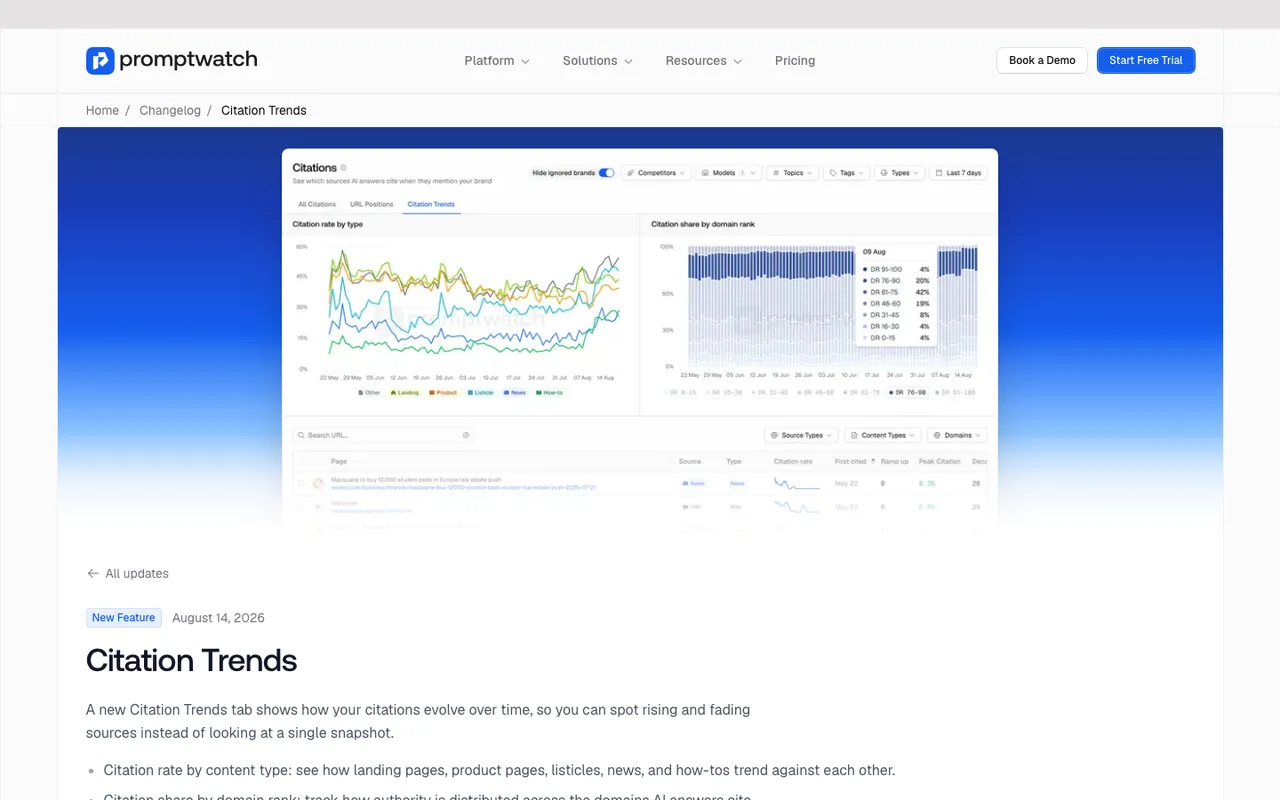
Promptwatch changelog entry for Citation Trends, captured November 14, 2026.
AthenaHQ: acts inside its own platform
AthenaHQ has an Action Center with assignable tasks and a content optimization agent. Starter is $295/mo. Bloomreach announced the acquisition on November 16, 2026. The catalog lists no CMS publishing agent with a review inbox and no crawler logs, so stations three and four are on you.
Agentic article engines
Outrank ($99/mo for 30 articles) and SEObot (from $49/mo for 9 articles) will write and publish on autopilot. Both are execution tools built around keyword research and article volume; neither publishes prompt tracking or citation data, so they rank below the two platforms above. Use them if your bottleneck is output and you measure elsewhere.
Writers that draft when asked
Frase, Writesonic GEO, and Surfer each add some AI visibility tracking to a writing tool. Frase can publish to WordPress, Webflow, Sanity, or Wix. Writesonic keeps its Action Center for Enterprise. Surfer's AI Tracker on Standard refreshes 25 prompts weekly. They help a writer write. They don't decide what to write next.
Jasper agents and AirOps workflows can be wired into an automated pipeline, but you build the logic.
A note on the Google side
Automation can't buy a shortcut into AI Overviews. Google's "AI features and your website" documentation says the same SEO practices apply and that no special markup or AI text file is required; a page just has to be indexed and eligible for a snippet. Google also says AI Overviews and AI Mode may fan a question out into several related searches. That's the useful hook for an agent: Promptwatch shows the query fanouts behind each tracked response, and the Content Agent can write directly from one of them.
What still needs a person
Automation stops at judgment. In our experience these jobs stay human:
- Choosing the prompt set. An agent can suggest prompts; deciding which buyer questions matter is a commercial call.
- Facts only you have. Pricing, proprietary data, customer specifics. Promptwatch's Knowledge Base (Professional and up) lets the writer search what you've given it, but someone has to supply it.
- Approving claims in regulated or sensitive topics. Keep the review inbox on for those.
- Crawler access. OpenAI says sites need to allow OAI-SearchBot to be eligible for ChatGPT search. A writer can't fix a robots.txt or CDN rule it can't see. Promptwatch's Agent Analytics will show whether OAI-SearchBot and ChatGPT-User reach the page, but an engineer makes the change.
Our recommendation
If you want a writer that acts, measure the whole cycle, not the draft. Promptwatch is the one tool here that closes it. Talk to an expert at Promptwatch about running the Content Agent in review-inbox mode for a month on a narrow prompt set, then decide whether to switch on full automation.