Turning AI brand perception data into a weekly to-do list
How to turn sentiment scores and AI claims about your brand into a short weekly list of tasks with owners, using Promptwatch's Action Board and Brand Narrative.
A perception dashboard answers "how are we described?" It almost never answers "what should Priya do on Tuesday?" That gap is why so many AI brand perception programs stall after the first month. The data is there, the sentiment line wobbles, someone screenshots it for a slide, and nothing on the website changes.
An action plan for AI brand perception is the boring part that makes the rest count: a short list of concrete tasks, each with an owner, a reason, and a way to tell when it's done. This article shows how to build that list every week without spending your Monday reading responses. The workflow is built around Promptwatch's Action Board, because it is the one tool we've used where an agent maintains the list instead of a person.
Why the chart isn't the plan
Most trackers stop at a chart for a structural reason. A chart is cheap to produce from data you already have. A task needs a judgment: which of the 40 negative responses this week share a cause, which page that cause lives on, and whether fixing it is worth more than the other five things on the team's plate. That judgment is the expensive part, and it's what an action plan has to supply.
So the weekly routine below is really about two questions. Which perception problems deserve a task this week? And who on the team owns each one?
The board, briefly
The Action Board is a kanban board of GEO tasks generated from your project's data. It has five columns: Suggested, To Do, In Progress, Done, and Dismissed. Suggested is the agent's inbox, where every card waits for you to accept or dismiss it. Done shows the last 14 days of completions, and Dismissed holds the last two weeks of rejected suggestions, collapsed by default, with a Restore button if you change your mind.
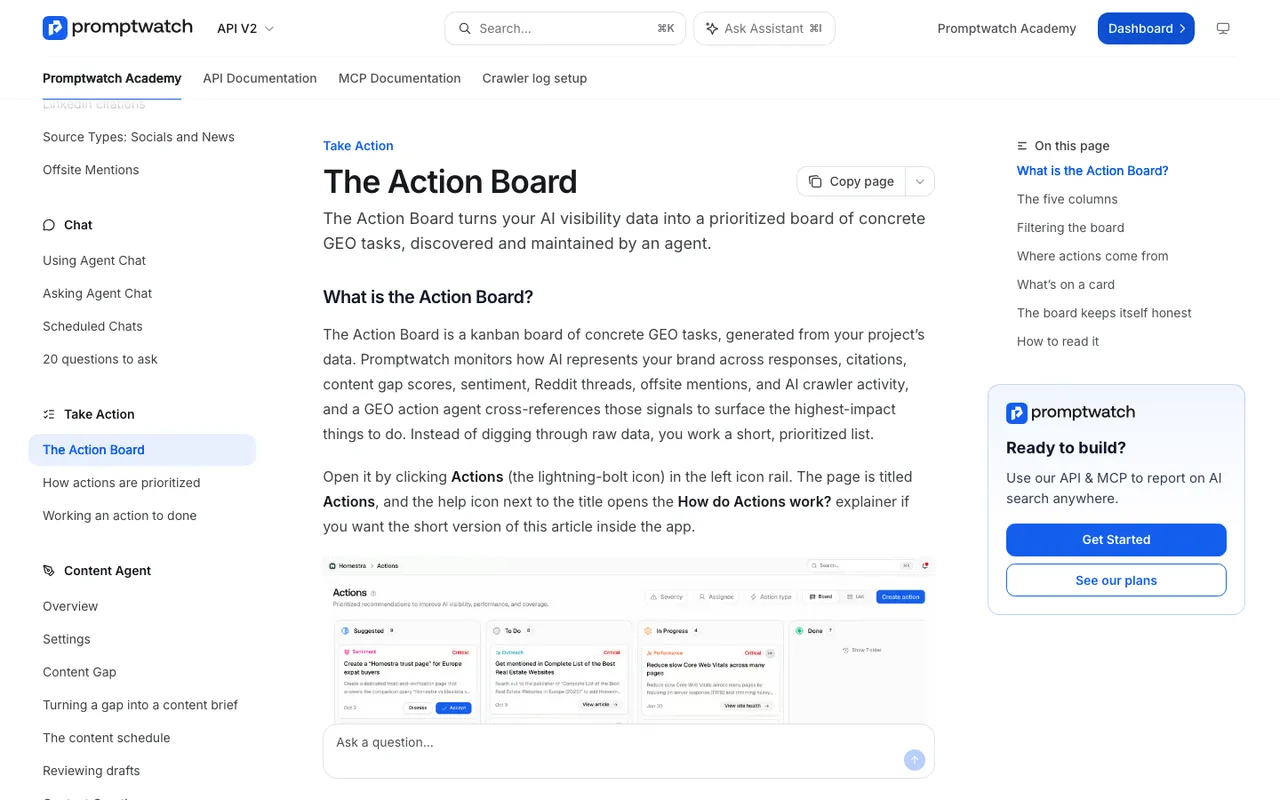 Promptwatch Academy's Action Board page, captured November 14, 2026. The board in the image uses an example project.
Every card carries a type, a severity (Critical, High, Medium, or Low), a title, and a description. Agent-written descriptions run three paragraphs: what to do, why it matters, and the expected GEO impact. Open a card and the right column shows Agent Reasoning, the evidence trail behind the suggestion. Read that before accepting anything.
Where the tasks come from
Three sources feed the board, and knowing which produced a card tells you how much scrutiny it already had.
The discovery agent is the main one. It investigates your data on a weekly schedule with one focus per day: content gaps, page signals (Untracked and Untapped pages), Reddit, offsite mentions, and sentiment. It works evidence first. It pulls the current board, gathers fresh data, drafts candidates, removes duplicates of what's already there, and saves at most five new suggestions per run so the board stays workable. It also goes back over its own older items: Suggested and To Do cards of that day's type that are seven or more days old get refreshed in place, or dismissed when fresh data shows they're outdated or already handled.
Setup actions are the second source. When a core integration is missing, such as crawler logs, visitor logs, a sitemap, or Search Console, a plain check (no AI) creates a High-severity setup action in To Do.
You are the third. "Create action" makes a custom card with a title, description, optional severity, and optional assignee. Agent Chat and the MCP server can also create actions when you ask them to, which matters for perception work, as you'll see below.
Perception tasks versus visibility tasks
The board mixes two kinds of work, and it helps to keep them apart in your head. The action type filter lists Performance, Site Health, Content Gap, Sentiment, Reddit, Setup, Untracked, Untapped, Outreach, and Custom.
Visibility tasks are about whether you get named: Content Gap, Untracked, Untapped, and most Performance cards. Perception tasks are about how you're described once named: Sentiment, Reddit, and Outreach cards, plus the custom cards you create from Brand Narrative findings. A brand that is named everywhere but described as "expensive and hard to set up" needs the second kind, and a filtered view of just those types gives the person who owns brand perception a list of their own.
A simple split that works for small teams: the SEO or content lead owns visibility types, and whoever owns positioning (often product marketing) owns perception types. Filters and the chosen view live in the URL, so each person can bookmark their own board.
Feeding the board from Brand Narrative
The discovery agent covers sentiment, but claim-level findings often need a human to turn them into a task. Brand Narrative is where you find them. It splits AI answers into individual claims about your brand and competitors, files each under one of nine themes, and scores each quote from 0 to 100, with the most negative claims at the top of the claims table. It is on every plan.
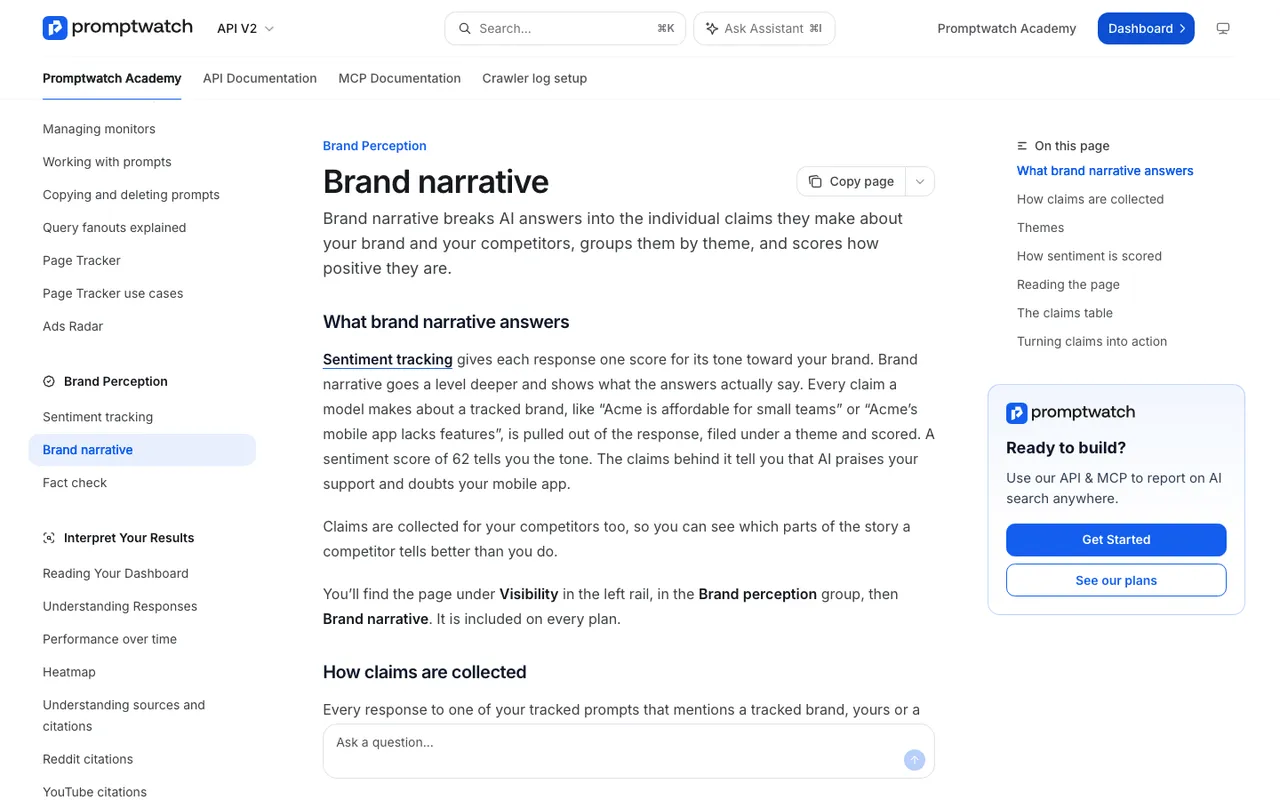 Promptwatch Academy's Brand narrative page, captured November 14, 2026.
Here is a weekly pass that takes about twenty minutes:
- Open the Negative tab. For each of the top claims, check how many responses repeat it and which models say it. Skip anything AI said once.
- Decide whether each repeated claim is wrong or fair. Wrong claims become a fact-check task. Fair criticism becomes a note for the product team, not a content task.
- Open the Citations tab on the claims that survive. Your own outdated pages become refresh tasks. Third-party pages become outreach tasks.
- Create the cards. Either use Create action, or ask the Agent Chat panel to do it; it can create typed or custom actions, and they land in To Do.
Say a project-management tool we'll call Acme finds "Acme is hard to set up for small teams" repeated across several models under Usability. The claim is fair-ish, but the Citations tab shows an old onboarding guide that still describes a setup flow Acme replaced. That becomes one Custom card ("Refresh the onboarding guide to match the current setup flow"), assigned to the docs owner at High severity, with the claim pasted into the description so whoever picks it up knows why.
The Monday routine
Put this on the calendar for the same slot every week.
Start with the digest. Organization owners can get a weekly email on Mondays with the past week's new Suggested actions and the top Critical and High priorities. It is skipped in weeks without new suggestions, so an empty inbox tells you something too.
Then clear Suggested. Accept or dismiss every card. Don't leave suggestions sitting; the agent counts open items per type before it adds more, so a cluttered Suggested column means fewer fresh ideas.
Next, pull from To Do by severity. Every column is sorted Critical first, then High, Medium, Low, and within a level newest first. The top card is the agent's best current answer to "what next?" Assign the top few, using the Assign to me shortcut or the assignee picker. Viewers can't be assigned, so make sure the people doing the work have editor access.
Finally, look at Done from last week. For any perception task that finished, note the date. That's your marker for checking later whether the claim it targeted faded.
Working a card to done
Cards carry a type-specific button. A Content Gap card has "Run content agent," a Reddit card has "View Reddit post," an Untracked card has "Generate prompts." Some of these open a dialog right on the board, so a refresh can start without leaving the page.
Comments and activity sit on the left of the detail dialog. Use them. When a refresh goes live, paste the URL into the card's comments before moving it to Done. Three weeks later, when someone asks whether that work changed anything, the trail is right there.
On Business and Enterprise plans with the Content Agent's automation switched on, Content Gap suggestions stop appearing on the board, because that pipeline turns gaps into drafts on its own. That's expected. Perception cards keep coming.
What it can't decide for you
The agent can find a pattern in negative responses. It can't tell you whether "too expensive for startups" is a perception problem or a pricing strategy you're comfortable with. It also can't contact a review site, rewrite a Reddit thread, or ship the mobile feature AI keeps saying you lack. Use the board to keep those decisions visible, not to outsource them.
From a claim to a measured fix
The loop this site cares about runs straight through the board. Brand Narrative or the discovery agent surfaces a perception problem. A card captures it with evidence and an owner. On Business, Fact Check confirms whether your own page is the source, and the fix runs through Content Refresh or the Content Agent and publishes to WordPress, Webflow, or Framer. After that, the claim's frequency in Brand Narrative and the crawler visits in Agent Analytics show whether the change took. If a page still underperforms, the agent brings it back as a new card.
That cycle is why we rank Promptwatch first for teams that want a perception plan rather than a perception chart. The discovery agent runs for any project with a website configured and an active or trialing subscription, so the 7-day free trial on monthly billing is enough to see a week of suggestions. Start it at promptwatch.com and hold your first Monday review a week later.